User Types in Schemation DEM
The diagram below shows the different account types and privileges afforded to each type. It shows what can be achieved through the user of an Oracle account, a Schemation DEM account and Schemation DEM controller status. At the centre of the digram is the user. Moving outwards are the different layers of account type that may be given to this user. The sections on this diagram represent the capabilities that the user will have when given the pattern of account/privileges given by the dots in the bands. So, for example, the lower left section shows the capabilities of a user that has an oracle account and nothing else. - This user is only able to log in to Oracle (assuming the create session privilege has been granted to this account).
The set of account options are:
* Oracle account only
* DEM account only
* DEM account with an Oracle account
* DEM account with Controller Status over one or more environments.
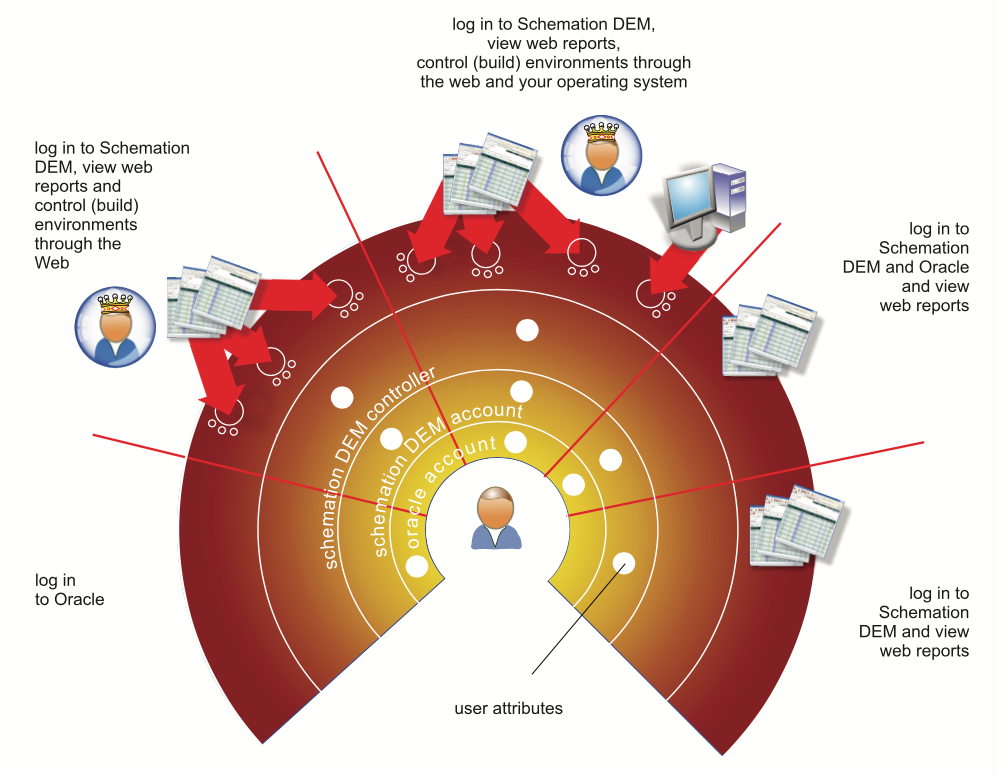
The set of account options are:
* Oracle account only
* DEM account only
* DEM account with an Oracle account
* DEM account with Controller Status over one or more environments.
DEM Accounts
A DEM account is required if a user wishes to build any type of environment, either from the operating system, or from the web-pages.
Oracle Accounts
An Oracle account is an additional mandatory requirement for a user who wishes to build environments directly from the operating system. (Custom Builds).
The merits of each of these account combinations are now discussed.
A User with Oracle Account Only
This is just a normal Oracle account which has at least the create session privilege. If the user only has this type of account, then the options are limited to the privileges granted to this account from within Oracle. In one sense, this type of account is nothing to do with the Schemation DEM at all. A user that only has this type of account would not be able to log in to the DEM web-based reporting application and would not be able to initiate an environment build.
A User with DEM Account Only
If a user has no Oracle account, but the DEM Administrator has created an account in the DEM, then this user will be able to log in to the DEM and view many different reports on the current build state of all environments under the control of the DEM. With the basic privileges, this user would not be able to 'control' any environments and access would only be in the form of read-only pages reflecting the build state of environments under the control of more privileged accounts.
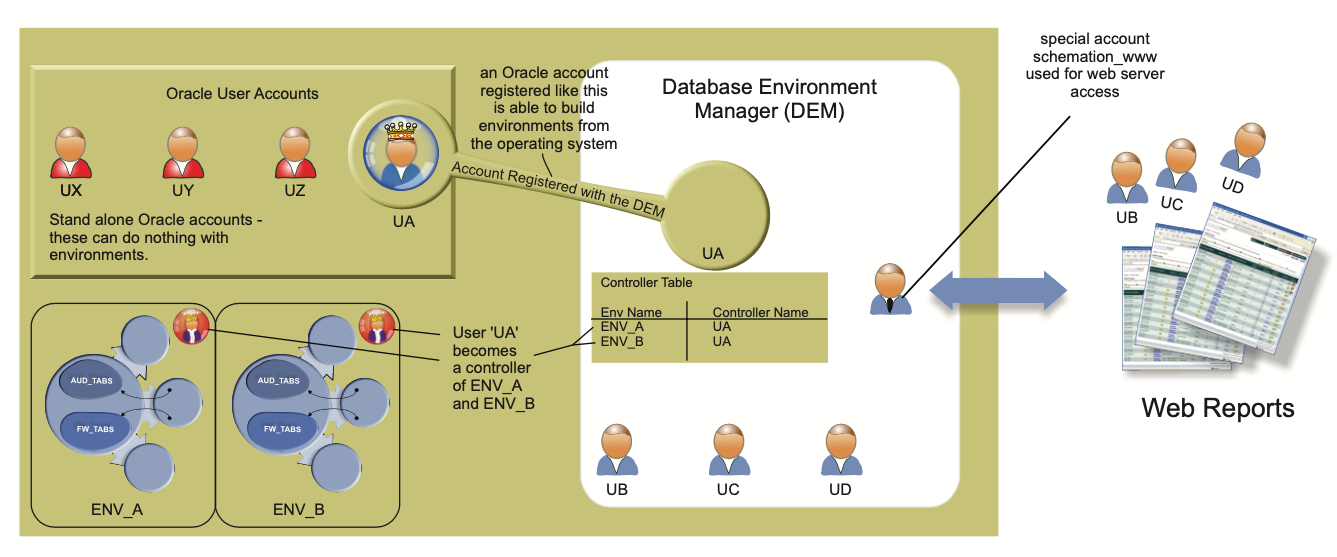

This type of account is useful for project managers and test managers who may wish to see the status of environments that affect them, without wanting privileges to build these accounts.
Note, that this scenario is not a natural one, as when a DEM account is created an Oracle account is automatically created for the user with the same name. To be in this position, would require a DBA to drop the Oracle account associated with the Schemation DEM account after its creation. If this were to be done, then this section describes the user's privileges.
A User with DEM Account and Oracle Account
This is a pairing of an Oracle account with Schemation DEM account. It may be set up in one of two ways.
* The Schemation DEM Administrator creates a new account.
* The Schemation DEM Administrator registers an existing Oracle account for use in the DEM.
Either of these methods may be used to create this scenario. The result is a fusion of privileges. The Schemation DEM account entitles the user to log in to the DEM and view reports. Additionally, the Oracle account will permit
the user to log in to Oracle. But, that's it. The user will just have two different accounts and would not be able to do anything special with DEM functionality unless also granted status of an 'Environment Controller' within the DEM.
When used, the registration process associates an existing Oracle account with a DEM account so that they may be used together.
They will remain two distinct accounts, which are linked for the purpose of using Schemation's DEM. The Oracle account must be used to log-in to the database to request Custom and Repository Builds, whilst the DEM account is used to log in to the web-based application (DEM to monitor build reports etc. They will both have the same username. But passwords may be different.
If created through the DEM, both DEM username and Oracle username will have the same password initially. But, this may change if the Oracle account password is changed outside of the DEM.
A User with DEM Account, Oracle Account and Environment Controller Status
This is the most common, and most powerful (except a DEM Administrator) set up for an account in the DEM. This type of account allows the user to have full access to the DEM web-reports, perform web-based environment builds and additionally perform builds from your operating system (Windows, Linux, UNIX).
Building from the operating system allows the user to customise every aspect of the environment build by making file changes and adding or deleting data as required. This activity would typically be used by anyone who needs to build and environment from source files. Usually, to test out source file changes in isolation. This type of build is the main focus of this document.
Once an environment has been defined, it may be built. An environment can only be built by a DEM user which is a listed controller of the environment. Defining an account as a controller of an environment is performed by the DEM Adminstration menus and MUST be done before the user account can build an environment.
An environment may be built by any of its controllers.