Security Map File
The Schemation DEM provides a very simple, intuitive and rapid means of defining the security grants and access synonyms required in a typical production quality database release. The file also presents the requirements of your environment in terms of schema names, schema privileges, default tablespaces and temporary tablespaces.
The intention, in designing the format of this file, was to present all the information that defines the privileges and inter-relations of schemas in a single file. This makes it easier for the DBA to assess the overall map of security within which your application will function.
The first sections of the security map file deal with the definition of schemas comprising an environment. These sections are shown below.
A further section, the security_map, is also a part of the security map file and will be discussed shortly.
The security map file is located
$SCH_HOME/build code/security_map.dat.
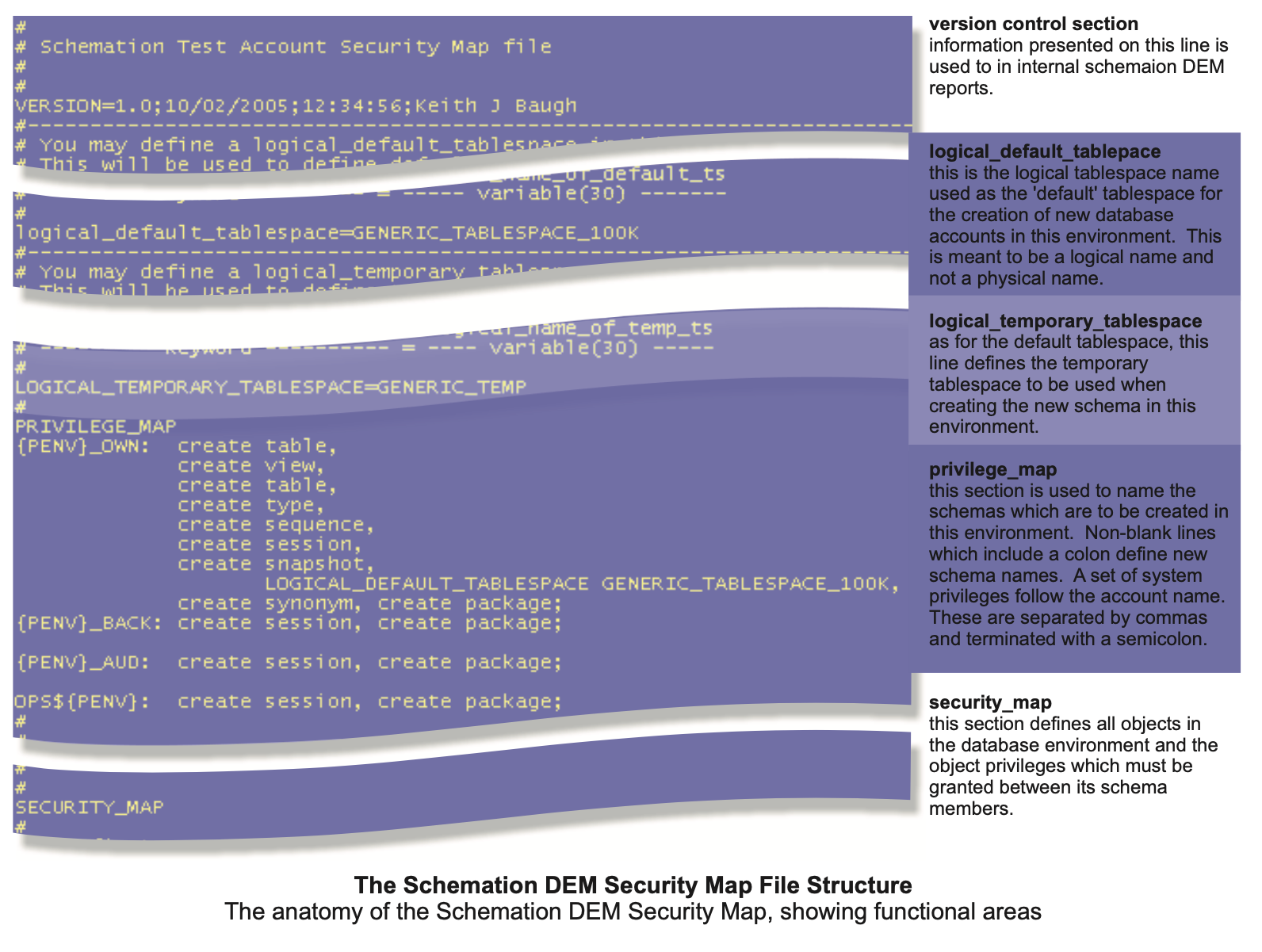
Sections of the Security Map File
Version Identifier
This section is the simplest of section and comprises a single line of text. All text following the VERSION= construct is copied into the DEM and is held against the enviornment built. There is no format associated with this line, but, it must remain a single line.
Logical Default Tablespace
The logical default tablespace section comprises a single line of the form
logical_default_tablespace=LOGICAL_NAME
Physical tablespace names are NOT used in the security map file. This is because, the definition of an environment's schemas should not be tied to a specific physical set of tablespaces. To do so would be to limit the usefulness of the defintion.
Here, the logical_default_tablespace, is set to the logical name of the tablespace in which schemas in the environment should be created. The parameter value may be overridden by a more locally defined default tablespace in the privilege map section (see later).
Logical tablespaces are set up by the DEM administrator. The DEM performs a translation from logical to physical at build time.
Logical Temporary Tablespace
The logical temporary tablespace section comprises a single line of the form
logical_temporary_tablespace=LOGICAL_TEMP_NAME
Here, the logical_temporary_ tablespace, is set to the logical name of the tablespace to be used as temporary space by schemas in the environment. The parameter value may be overridden by a more locally defined default tablespace in the privilege map section (see later).
Privilege Map
This section is used to define the names of the schemas used in the environment.
Each schema name MUST contain a {PENV} prefix.
When built, the {PENV} is expanded by the DEM into the name of the environment which is being built. These names then uniquely identify schemas within a database and also within an environment.
The format of this section is:
username including {PENV}:
comma separated list of system privileges,
[logical_default_tablespace=logical name,]
[logical temporary tablespace=logical name,];
A schema name will be defined on a new line terminated with a colon. Following this, a comma separated list of System Privileges follow the schema name. In this section, you can overide the logical default tablespace and/or the logical temporary tablespace. Each schema definition is terminated with a semi-colon.
It is worth noting that not all system privilges are available for granting to schemas in an environment. The DEM, allows the DBA to allocate which system privileges are permitted' to be granted to members of the enviornment's schemas. This is an allocation that is made at the "Project' level.
If an unauthorised privilege is defined in the security _ map file for an environment, the DEM will issue a warning at build time:
WARNING SCH-00015: Security Map File contains a role or privilege (CREATE ANY SYNONYM) for which the DEM lacks administrative rights.
WARNING SCH-00015:+Consider asking your DBA to issue (GRANT CREATE ANY SYNONYM TO SCHEMATION WITH ADMIN OPTION)
WARNING SCH-00015:+Alternatively it may be that (CREATE ANY DOOMSDAYMACHINE) is NOT a valid privilege or role.
Note on DB security
In modern database architectures it is standard practice and good security practice to separate accounts which own physical objects from accounts which are used to process data in those objects. There are many reasons why this is a good way of working but one of the simplest to understand is that of safeguarding the data from human error - discussed now.
For example, suppose you have a database which holds up-to-date online ordering information. Data is stored in this database by direct insertion from applications which support your customers. Meanwhile, your order fulfillment department, who only work during the day, have access to a different application which is able to support their activities. In such a system, there is good reason to separate the customer application from the backend services application. It would also be good practice to place all tables and program units (stored procedures), which hold and process the data, into a different schema. In some installations, the schema that owns the data is denied the 'create session' privilege as this provides a good safeguard against someone logging in 'accidentally' and dropping objects which hold significant valuable data. In such a system, database accounts are created around the owner account which are granted permissions only on the objects with which they are supposed to work.
Security Map
The final section of the security map file is the security map itself. This is introduced by the keyword
SECURITY_MAP
which should appear on a new line.
The first non-comment line of the security map section is taken to be a list of schema names.
These names should be exactly as defined in the Privilege Map section. All schemas should really be listed on this line. This line provides two functions.
* Defines column heading for data that follows
* Defines column separation character (tab or spaces)
An additional schema name may appear in this list ' {CONT}' - this stands for "Controller' and this will be discussed shortly.
In the example below the line indicated by (1) is the Security Map Header. It defines the separation character (spaces in this case) and the order of columns as: {PENV}_OWN; (PENV}_BACK; {PENV}_AUD;
OPS${PENV}; and {CONT}. The DEM examines the line itself to determine which separation character is employed.
Lines following the Security Map Header are called 'Object Privilege Lines'. Each line represents a single database object and the complete set of privileges that the other schemas in the environment require on that object. Line (2) shown below, shows one example of an Object Privilege Line.
There are a few rules to be observed when defining Object Privilege Lines.
All database objects that carry a privilege must be declared in one and only one Object Privilege Line.
Each Object Privilege Line must contain only a single object definition.
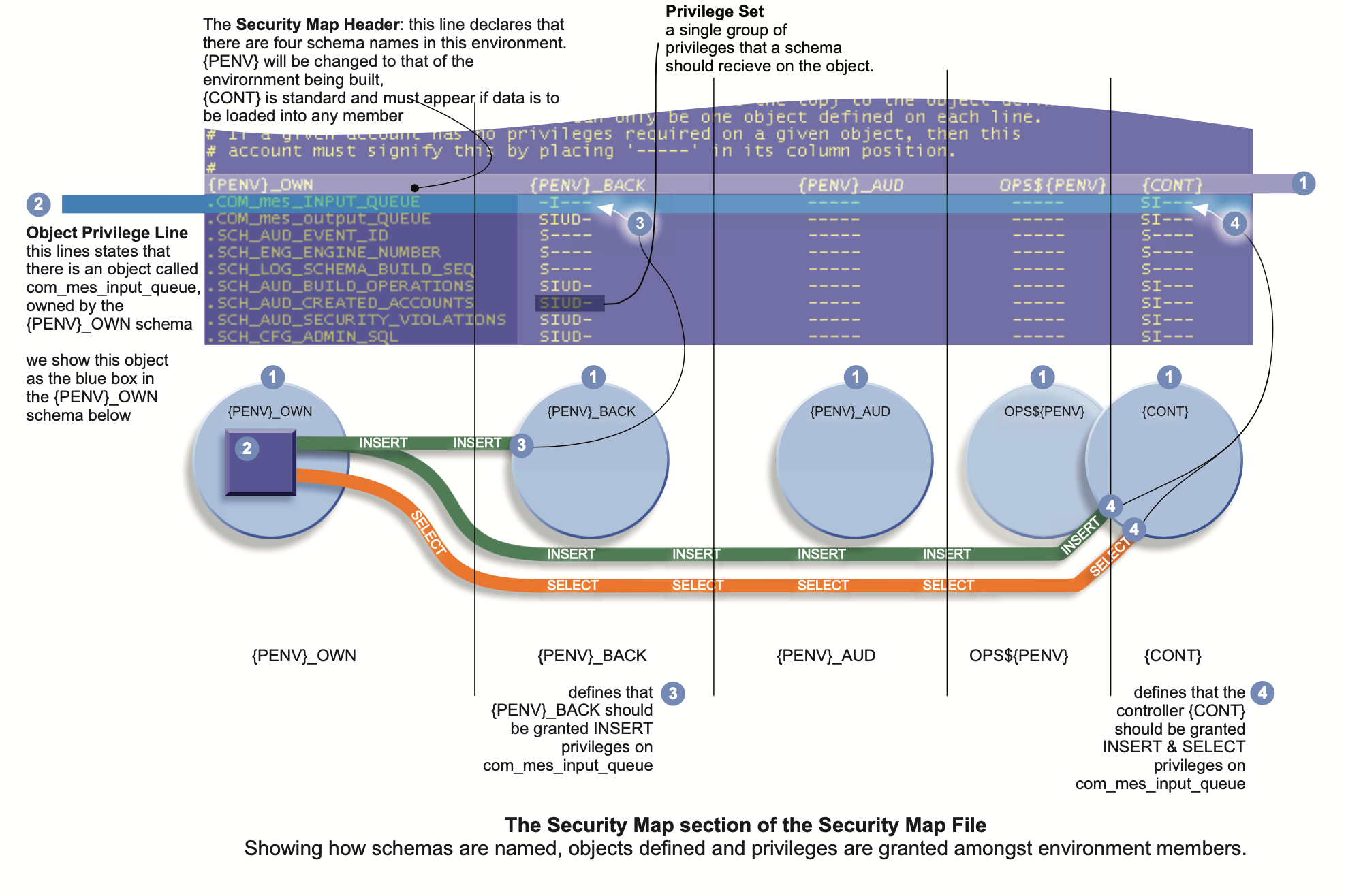
Elements of the Privilege Set
| s | - | SELECT | S | - | SELECT with grant option |
| i | - | INSERT | I | - | INSERT with grant option |
| u | - | UPDATE | U | - | UPDATE with grant option |
| d | - | DELETE | D | - | DELETE with grant option |
| x | - | EXECUTE | X | - | EXECUTE with grant option |
| > | - | SYNONYM | Creates a synonym to resolve the object across schemas. The synonym will have the same name as the object. |
Rules for defining the privilege map
An Object definition is made by naming the object within the column of the schema that owns the object.
The object should always be prefixed with a 'dot'.
Each defined object, must define a Privilege Set for each of the other schemas listed in the Security Map Header.
All database objects should be prefixed with a dot character and positioned under the schema that owns the object.
A security entry MUST be made for each schema listed in the header and for each object in the schema. The DEM will warn if there are objects missed.
If data is to be loaded into a table, then the {CONT} column must be defined and the privilege
A security entry comprises a set of single characters each conveying a privilege on the related object:
An example...

This states that there is an object in the {PENV}_OWN schema.
The {PENV}_WEB account has: SELECT; INSERT; UPDATE and DELETE privilges on this object and a synonym is to be created in the {PENV}_WEB account that resolves to this name.
The {PENV}_LOAD account has: INSERT and DELETE privileges on the same table and also requires a synonym to resolve the name of the object.